
OpenClaw for Consultants: What It Automates & Costs
OpenClaw for Consultants: What It Automates and What It Costs
Four numbers frame this whole piece: $49 a month, flat. 100+ pre-built skills. 20+ messaging apps. A setup that takes about three to seven minutes. If you sell your time, here is how OpenClaw for consultants turns those numbers into hours you get back.
Key Takeaways
- OpenClaw is an AI agent that lives in WhatsApp, Telegram, Slack and 20+ other messaging apps. It can answer inquiries, ask qualifying questions, send emails and set reminders for you.
- OpenClawHQ runs a private, managed instance for $49/month flat. Usage is unlimited, and there are no token fees, no server and no API keys to manage.
- Setup is a web wizard that takes roughly three to seven minutes, depending on the channel. No command line, no coding.
- It supports your judgment rather than replacing it. Strategy, pricing and client advice stay with you.
What Problems Does OpenClaw for Consultants Solve?
Consultants lose billable hours to work that never appears on an invoice: replying to first-contact messages, asking the same qualifying questions, chasing meeting times, and following up on proposals. OpenClaw takes over that repetitive layer inside the messaging apps your prospects already use.
The pain is rarely one big task. It is forty small ones, scattered across a week, each interrupting deep work. A prospect messages at 9pm, waits until noon, and by then has talked to someone else.
Here is how the cost structure compares with a typical stack. Figures for other services come from their published pricing as of our last review.
| What you need | Typical approach | With OpenClawHQ |
|---|---|---|
| First-reply to new inquiries | You, or an assistant you pay | OpenClaw, in your chat app |
| Qualification questions | Manual back-and-forth | Asked automatically in conversation |
| Scheduling and reminders | A separate scheduling tool | Calendar and reminder skills |
| AI usage | Per-token billing or your own API keys | Included, unlimited |
| Server and upkeep | Your VPS, your updates | Managed for you |
| Monthly cost | Several subscriptions plus usage | $49 flat |
Not technical? That is the usual worry, and it is fair. Our guide to using OpenClaw without coding covers the setup flow in plain language.
Reality check: OpenClaw does not give advice to your clients. It handles the conversation around the advice.
How Much Time Can OpenClaw Save a Consultant?
The honest answer depends on your inquiry volume, and we won't invent a headline figure for it. What we can give you is a formula: weekly inquiries multiplied by the minutes you spend on each reply, qualification and scheduling exchange. Whatever OpenClaw handles end to end comes straight off that total.
Run it on your own numbers. If you get 30 inquiries a week and spend 10 minutes on each, that is five hours before a single meeting happens. Cut that handling to a quick review of the cases that reach you, and the saving is yours to measure.
Two things make the math friendlier than it looks:
- Replies go out at any hour, so a late-night message does not wait for morning.
- Unlimited usage means a busy week costs the same $49 as a quiet one.
That second point matters more than it sounds. With token-billed tools, the weeks you win the most work are also the weeks your bill climbs.
Is OpenClaw for Consultants Good at Client Management?
Yes, within limits. OpenClaw can answer common questions, send follow-up emails, set reminders and keep conversations moving across multi-step exchanges, because it is an agent rather than a rules-based bot. It does not replace a CRM or your own relationship with the client.
Think of it as a very fast junior colleague who never sleeps and never makes the strategic call. You decide what it says and when it hands over to you.
Three roles show how this plays out:
- Management consultants qualify prospects by budget, timeline and scope before a discovery call.
- Real estate agents field listing questions and book viewings.
- Fractional CFOs answer recurring questions about invoices, deadlines and reporting calendars, and flag anything that needs a human.
Insurance agents automating lead follow-up use almost the same pattern, so the setup carries over between professions.
What Consultant Tasks Does OpenClaw Handle?
OpenClaw handles first replies, FAQ answers, qualification questions, meeting scheduling, reminders and follow-up emails. It runs these through its pre-built skills, which you activate by name from the dashboard or in conversation.
For a broader look at what businesses in other fields do with it, see our roundup of OpenClaw use cases. The consultant version of the flow looks like this:
- A prospect messages you on WhatsApp.
- OpenClaw replies immediately and asks a few qualifying questions.
- It proposes a time and books the meeting.
- You get a notification with the context already summarized.
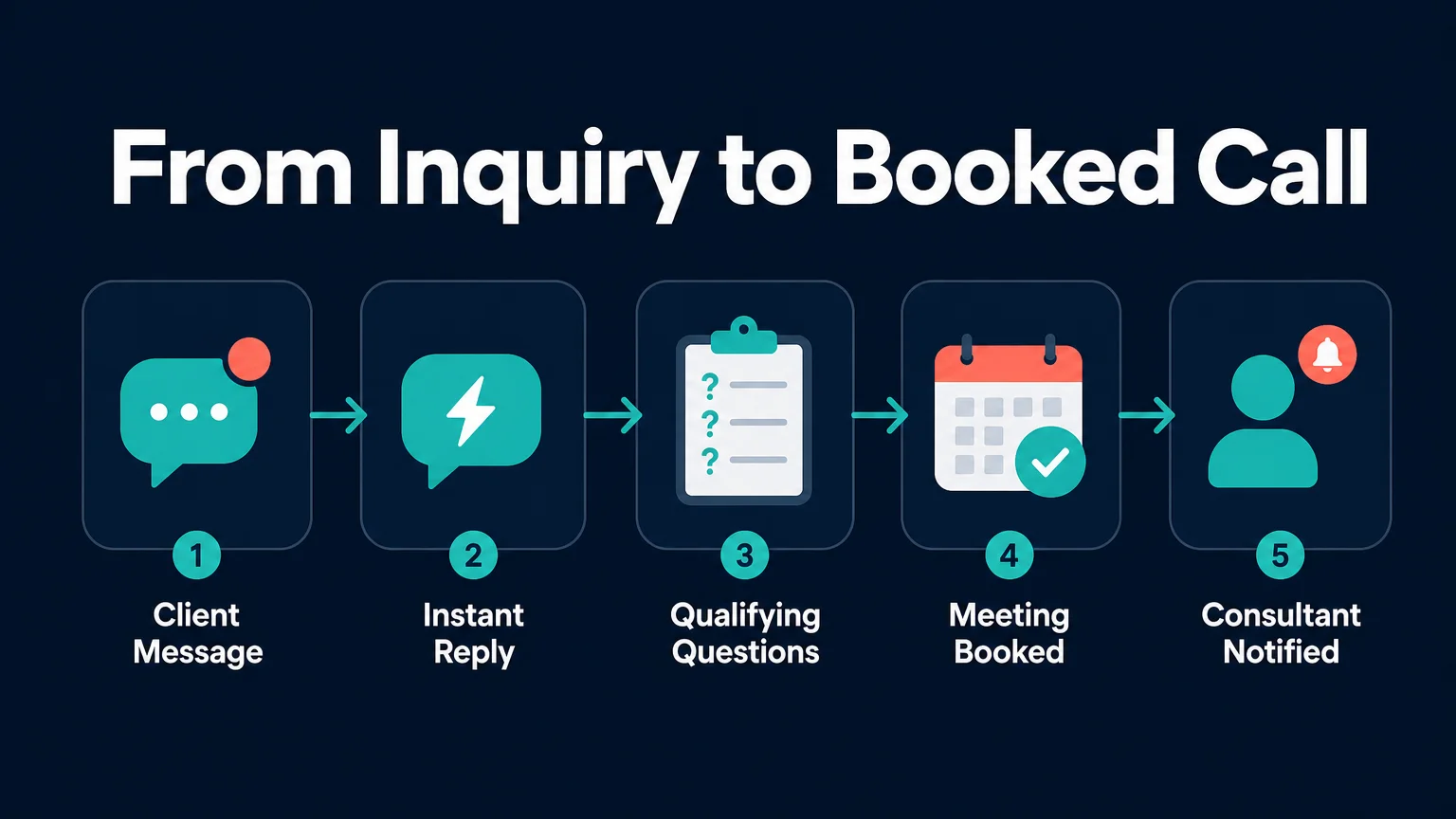 Five steps, one conversation. You step in at the last one.
Where it stops
OpenClaw is not built for firms with formal compliance requirements such as SOC 2 or HIPAA. It is also overkill if all you want is a simple FAQ chatbot.
How Much Does OpenClaw Cost for Consultants?
 Several bills on one side, one flat price on the other.
OpenClaw the software is free and open source. But running it needs a dedicated server, technical setup and your own AI API costs. OpenClawHQ gives you a fully managed instance with everything included for $49/month flat: no server, no API keys, no token fees.
Here is how the managed options stack up on billing structure:
| Service | Hosting fee | AI usage | What you pay |
|---|---|---|---|
| KiloClaw | $9/mo | Per-inference fees | Varies with use |
| xCloud / MyClaw | $16/mo | Bring your own API keys | $16 plus your API bills |
| Blink Claw | $45/mo | Included, capped | $45 for limited usage |
| OpenClawHQ | $49/mo flat | Included, unlimited | $49 always |
A consultant reselling expertise bills in time. A tool whose cost moves with usage is a tool whose margin moves with it. Flat pricing removes that variable.
If you are weighing the same maths for a services business with staff, our piece on OpenClaw for agencies walks through the scaling side.
Can I Use OpenClaw on WhatsApp and Email as a Consultant?
Yes for WhatsApp, Telegram, Slack, Discord, iMessage, Signal and 20+ other messaging apps. OpenClaw also sends emails as one of its skills. In OpenClawHQ's guided setup, WhatsApp connects by scanning a QR code in the dashboard.
Pick the channel your clients already use. A consultant with European clients may live on WhatsApp; one working with tech startups may prefer Slack or Telegram.
Start with one channel. Add more once you trust how it behaves.
What Skills in OpenClaw Help Consultants the Most?
The most useful skills for consultants are calendar management, reminders, email sending, web search and document summarizing. They cover scheduling, follow-up, prospect research and reading long client material, which are the four places a solo practice leaks time.
You choose which of the 100+ skills are active, so a lean setup is fine. Tell OpenClaw to turn on calendar and email, and leave the rest off until you need them.
Worth knowing: Some consultants end up building an AI services side business around the same setup. If that is you, our article on consultants building an AI services side business is where this naturally leads, and scaling your automation beyond a solo consultant is the next step after that.
Get Started with OpenClawHQ
 Your instance is live once the setup wizard finishes.
Sign up, pick a channel, follow the guided steps, and your private instance is running in minutes. One plan, $49/month, unlimited usage.
FAQ
What is OpenClawHQ?
OpenClawHQ is a managed hosting service for OpenClaw, the open-source AI agent. You get a private instance that is configured and running within minutes. It costs $49/month flat with unlimited usage, and you never touch a server, write code or pay token fees.
How do consultants use OpenClaw day to day?
They connect it to a chat app and let it handle first replies, qualification questions, scheduling and follow-up emails. The consultant reviews summaries and steps in for anything that needs judgment. Which tasks to delegate is entirely your choice.
How long does setup take on WhatsApp?
About five minutes. Choose WhatsApp as your channel in the OpenClawHQ dashboard, scan the QR code, and the instance connects. There is no command line and no server to configure, because OpenClawHQ runs the backend.
Is my client data shared with other customers?
No. Each OpenClawHQ customer gets an isolated private instance, so your conversations and configuration are stored separately. Security updates are applied for you. Firms with strict compliance needs should assess fit themselves first.