
OpenClaw for Ecommerce: Automate Customer Service
OpenClaw for Ecommerce: Automate Customer Service Without Hiring
Most online stores answer customer messages in the order they arrive — whether that's 9 a.m. or 2 a.m., whether it's a shipping question or a return request. Every message waits its turn behind whoever wrote first, and the backlog never really clears. OpenClaw for ecommerce changes that math: it's an autonomous AI agent, not a scripted chatbot, that reads what a customer is actually asking inside WhatsApp or Telegram and replies immediately, any hour, without a human queueing it up.
For a store owner drowning in "where's my order" pings, that's the gap between losing a sale to slow response time and closing it the moment someone's ready to buy.
What OpenClaw for Ecommerce Actually Means for Your Store
OpenClaw is the open-source AI agent behind this — built by developer Peter Steinberger, now past 247,000 GitHub stars, and one of the fastest-growing open-source AI projects in recent memory. It doesn't just answer scripted questions. It reasons through a conversation, pulls in context, and can execute real tasks: browsing the web, checking a document, sending a follow-up email, or running one of over 100 pre-built "skills."
For an ecommerce store, that translates into a short but real list of jobs it can take off your plate:
- Answering order status, shipping, and return questions the moment they arrive
- Following up automatically after a purchase or an abandoned question
- Fielding product questions using whatever details you've given it
- Running 24/7 without a night-shift hire
Running OpenClaw yourself means installing Node.js, configuring a server, and keeping a background process alive around the clock — our OpenClaw use cases roundup covers what that setup looks like across different businesses. OpenClawHQ skips all of it: sign up, connect your channel, and the instance is live.
How OpenClaw for Ecommerce Automates Customer Service
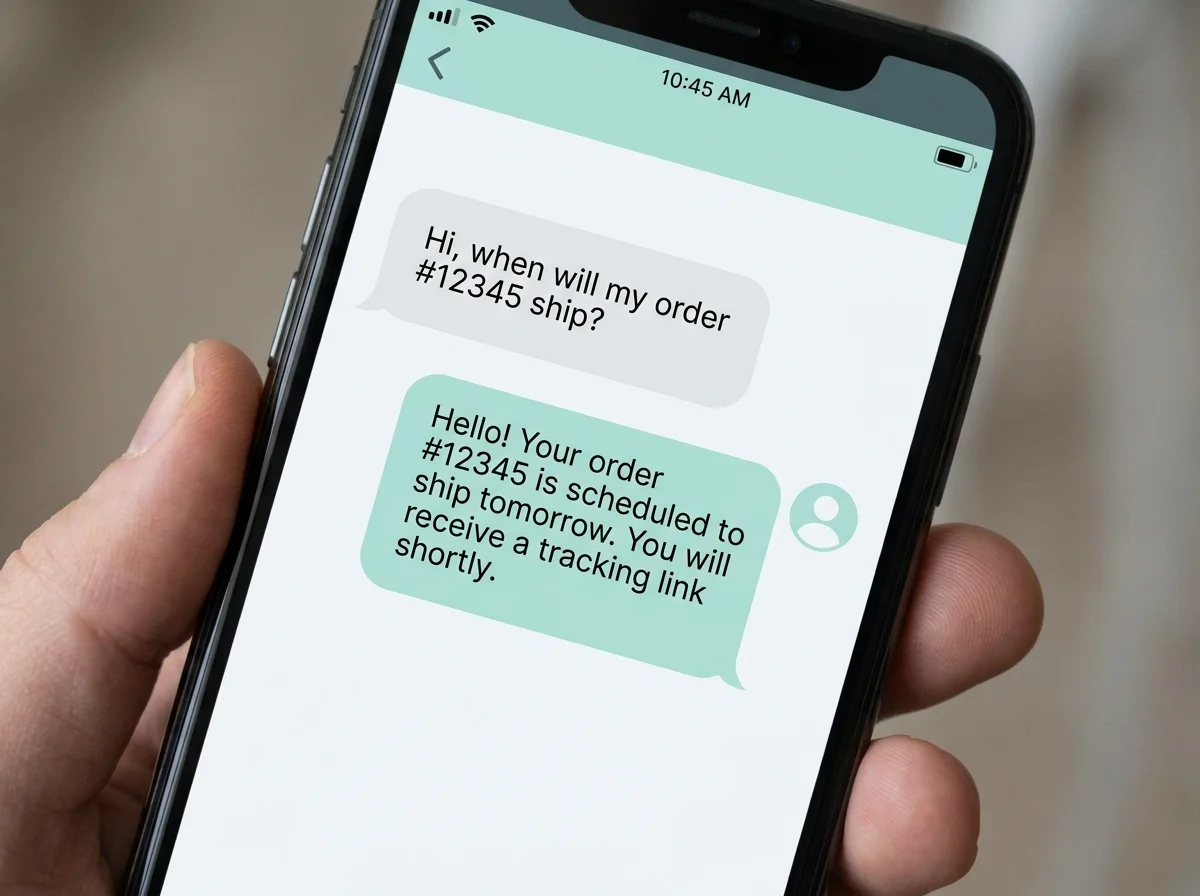 Customer questions get answered inline, without a human relaying each reply.
Picture the actual flow: a customer messages your store's WhatsApp number asking whether a jacket runs true to size. OpenClaw reads the question, checks whatever product details or sizing notes you've configured, and answers in seconds — no hold music, no "someone will respond within 24 hours."
That's a meaningfully different experience from a rules-based chatbot, which can only match a question to a pre-written script and fails the moment a customer phrases something unexpectedly. OpenClaw reasons through the actual sentence.
It works across more than 20 messaging platforms — WhatsApp, Telegram, Discord, Slack, Instagram DMs among others. If most of your customers already message you on WhatsApp, setting up OpenClaw on WhatsApp specifically takes about five minutes.
Related: OpenClaw for Lawyers: What It Automates & What It Costs
Order Follow-Ups Happen Automatically, Not Just Message Replies
Customer service automation usually stops at answering inbound questions. OpenClaw goes a step further and initiates messages too — a shipping confirmation, a "how did the product work out" check-in three days after delivery, a nudge on an abandoned cart.
None of that requires you to write the message each time. You set the skill up once — what to send, when, and to whom — and OpenClaw runs it in the background for every order that matches, the same way a human assistant would if you had one dedicated to it.
A Real AI Agent Beats a Scripted Ecommerce Chatbot
Most "ecommerce chatbots" are decision trees dressed up as conversation. Ask something outside the script and you get "I didn't understand that, please rephrase" — the exact experience that makes customers give up and email instead.
OpenClaw isn't built that way. It's an agent: it can browse a page, pull real information, and hand you a fully reasoned answer instead of a canned one. The tradeoff other services don't mention is billing — most managed OpenClaw hosts charge a base hosting fee plus a variable fee for every message the AI processes, which is fine at low volume and expensive the moment your store actually scales.
If you're building a service business around this instead of running your own store, the economics work differently — see how agencies resell OpenClaw automation to other shop owners or charge stores directly for managed setup. A dropshipping operation specifically runs into its own inventory-sync quirks worth a dedicated breakdown, but the underlying automation is the same agent doing the work.
How Much Can an Ecommerce Business Save With OpenClaw Automation?
OpenClawHQ charges $49/month flat with unlimited customer messages and order follow-ups — no per-message or per-token fee, regardless of how many conversations your store generates that month. That's the detail most competing services bury: they charge a low hosting fee upfront, then bill separately for every message the AI processes. It's also why "OpenClaw is free" only tells half the story — see what OpenClaw actually costs to run for the full picture.
Worth knowing: A store doing a few hundred customer conversations a month and one doing several thousand pay the exact same $49 on OpenClawHQ — the bill doesn't move with your traffic.
Here's how that stacks up against other managed OpenClaw options:
| Service | Hosting Fee | Token/Usage Fee | Typical Monthly Total |
|---|---|---|---|
| KiloClaw | $9/mo | Per-message via gateway | Can exceed $30+ as volume grows |
| xCloud / MyClaw | $16/mo | You pay your own API bill | $16 + your API costs |
| Blink Claw | $45/mo | Included but capped | $45, limited usage |
| OpenClawHQ | $49/mo flat | Included, unlimited | $49 always |
For a full breakdown of how OpenClawHQ's flat rate compares to KiloClaw specifically, see KiloClaw vs OpenClawHQ.
A seasonal spike — a holiday sale, a viral product moment — is where that flat rate earns its keep: the difference between a predictable bill and a surprise one landing right when cash flow matters most.
Does OpenClaw Work With Shopify, WooCommerce, or Other Platforms?
Yes — because OpenClaw connects through your messaging apps rather than plugging into your store's backend, it works the same way whether your store runs on Shopify, WooCommerce, or a custom cart. You're not installing a platform-specific plugin; you're connecting a channel your customers already message you on.
If you want OpenClaw to check live order status or inventory from your store platform directly, that's a skill — a specific automation you or OpenClawHQ configure to call your platform's API. It's not something switched on by default, but it's within what the agent is built to do: OpenClaw can call APIs and browse the web as part of its normal skill set, not just answer from a script.
How to Set Up OpenClaw for Your Online Store in Minutes
 Same store, same order volume — the difference is what's running in the background.
Setup follows the same guided path regardless of which platform your store runs on. Most owners go from signup to a live, responding instance in one sitting — no waiting on a support ticket to configure anything.
- Sign up at openclawhq.io with an email and password
- Choose your channel — WhatsApp, Telegram, Discord, Slack, or another supported app
- Follow the web-based wizard: a WhatsApp QR scan, a Telegram bot token, or an Authorize click for Discord/Slack
- Your instance goes live — message your connected channel and OpenClaw responds
- Turn on the skills you want active: order follow-ups, product Q&A, or others from the 100+ available
The whole thing takes 3 to 7 minutes, and there's no command line at any step — the dashboard handles the parts that would otherwise require a developer.
Get Started with OpenClaw for Your Store
Answering every customer message by hand gets old fast — this is the quickest way to hand that off without hiring or learning to code. Get Your OpenClaw Instance and have your store's first automated conversation running within the hour.
Quick recap
- OpenClaw for ecommerce answers customer messages inside WhatsApp, Telegram, and 20+ other apps — instantly, 24/7, without scripts.
- It's an autonomous agent, not a rules-based chatbot: it reasons through questions and can browse, check inventory, and run automated order follow-ups.
- OpenClawHQ's $49/month flat rate includes unlimited usage — no per-message fees that climb as your store grows.
- It connects through messaging, so it works the same whether your store runs on Shopify, WooCommerce, or something custom.
- Setup takes 3–7 minutes through a web dashboard — no server, no code, no developer required.
FAQ: OpenClaw for Ecommerce
What can OpenClaw actually do for my online store? Inside the messaging apps your customers already use — WhatsApp, Telegram, Discord, and 20+ others — OpenClaw acts as an AI employee that answers order and product questions, follows up after a purchase, and runs any of 100+ pre-built automations. OpenClawHQ delivers this fully configured for $49/month.
Is OpenClaw free to use for ecommerce? The OpenClaw software itself is free and open source. Running it, though, requires a dedicated server, technical setup, and your own AI model API costs. OpenClawHQ handles all of that for $49/month flat, including unlimited AI usage, so there's no separate infrastructure or token bill to manage.
How do I connect OpenClaw to Shopify or WooCommerce? There's no platform-specific plugin to install — OpenClaw connects through your store's messaging channel, so it works the same regardless of your ecommerce platform. If you want it pulling live order or inventory data from Shopify or WooCommerce directly, that's configured as a skill calling your platform's API.
Can OpenClaw handle complaints, not just simple order questions? Yes. Because it reasons through the actual message rather than matching keywords, OpenClaw can process a genuine complaint, pull relevant order details, and respond appropriately — or flag it for you if the situation needs a human decision, like a refund exception.
Do I need technical skills to set up OpenClaw for my store? No. OpenClawHQ's setup runs through a web dashboard — connecting WhatsApp is a QR code scan, Telegram is a bot token you generate in a few clicks. There's no command line, no server configuration, and no coding at any point in the process.